• Contact us on WhatsApp WhatsApp
  • Book a Call
  • Contact Us

Trusted By

Trusted by startups and global enterprises across the USA, UK and Europe, Concetto Labs has been delivering high-performance AI-Driven software solutions for over 10+ years, helping ambitious businesses scale faster, deliver smarter and perform stronger in an ever-evolving digital world.

ZS Logo
Webcor Logo
Lady Boss Logo
IHG Logo
Lucidya Logo
i.am+ Logo
Aarete Logo
NTPC Logo
InterContinental Hotels and Resort Logo
Sandvik Logo
Wipro Logo
Spie Logo
MB Aerospace Logo
ESTEE LAUNDER Logo
Bargain Fox Logo
Avaloq Logo
NBK Logo
KRONES Logo
Next-Gen Growth Metrics

Proven Results & Impact That Speak For Themselves

Engineering tomorrow’s digital experiences with next-gen technology to deliver verifiable ROI and sustained market leadership.

WEB & MOBILE APPS DEVELOPED

550+
MOBILE APP DEVELOPED

TECHNOLOGY EXPERT

130+
TECHNOLOGY EXPERT

YEARS OF EXPERIENCE

10+
YEARS OF EXPERIENCE
HAPPY CLIENT

HAPPY CLIENT

500+
CLIENT RETENTION RATE

CLIENT RETENTION RATE

97%
POWER APPS DEVELOPED

POWER APPS DEVELOPED

100+
Microsoft Dynamics Certified Consultants

What is Business Central Microsoft Dynamics 365?

Formerly known as Dynamics NAV, Microsoft Dynamics 365 Business Central is an AI business management tool designed for start-ups and small to medium-sized organizations that operate in the cloud. It is a perfect all-in-one application for enterprises in progress, since it can handle business processes within the organization and has basic CRM capabilities. It can also be used by customers to transition from their basic accounting software to Dynamics 365 Business Central. Upgrade from NAV to Microsoft Dynamics 365 BC, the advanced digital ERP system that can address different business processes for operations, sales, finance, and customer service.

Business Central is the right fit if you're outgrowing QuickBooks or spreadsheet-based accounting and need finance, sales, and inventory connected in one system — typically businesses with 10 to 250 employees. If you need a highly specialized, industry-vertical ERP with deep out-of-the-box functionality beyond Business Central's extension framework, we'll tell you that directly in a free consultation, rather than force-fitting the platform.

Schedule Your Free Consultation Now
What is Business Central Microsoft Dynamics 365?

Core Capabilities Boosting Microsoft Dynamics 365 Business Central

Financial Management Financial Management
  • General Ledger : Establish a company, manage accounts, journals, VAT, recurring entries, and source codes.
  • Budgets : Efficiently handle budgets within the general ledger.
  • Deferrals : Automate revenue and expense deferrals with customizable templates.
  • Fixed Assets : Track and manage acquisitions, depreciations, disposals, and other asset transactions.
  • Audit Trails : Automatically generate audit trails and customize reason codes for thorough transaction tracking.
  • Bank Account Management : Create and manage multiple bank accounts for diverse business needs and currencies.
  • Reconciliation : Automatically match bank statements to ledger entries for accurate record-keeping.
  • Dimensions : Enhance transaction analysis by adding unlimited dimensions to any ledger.
Inventory Management Inventory Management
  • Item Master Management : List and create product cards based on your business needs.
  • Bill of Materials : Generate bills for parent items or stock components for sales.
  • Item Categorization : Maintain a broad view by categorizing items effectively.
  • Item Attributes : Assign attributes to items for easier search and identification.
  • Inventory Counting : Track inventory and stocks in real-time for accurate data.
  • Inventory Transfer : Streamline inventory transfers to move items efficiently.
  • Item Reservation : Reserve items for sales, service, purchase, and production orders.
  • Item Tracking : Track products using serial or lot numbers for recalls.
Sales and Marketing Sales and Marketing
  • Customer Management : Efficiently handle customer inquiries and foster strong relationships.
  • Sales Quotes : Create, modify, and send sales invoices before finalizing prices.
  • Sales Orders : Develop sales orders with options for drop-shipping and partial shipping.
  • Sales Invoices : Generate sales invoices based on client negotiations.
  • Drop Shipments : Directly ship goods to customers via purchase orders.
  • Sales Returns : Process refunds and update real-time stock information.
  • Assembly Orders : Fulfill orders using linked assembly when products are unavailable.
  • Order Planning & Promising : Schedule and ensure timely delivery of orders.
Project Management Project Management
  • Resource Management : Register, sell, and track individual resources or combine them into resource groups.
  • Estimates : Monitor resource usage, capacity, availability, and planned costs on orders and quotes.
  • Job Tracking : Manage usage, invoicing, and data for both fixed-price and time-and-materials jobs.
  • Time Sheets : Simplify time registration with manager approval, integrated with Service, Jobs, and Basic Resources.
  • Project Creation : Create, schedule, and manage projects efficiently.
  • Resource Allocation : Allocate resources based on project priority and utilization.
  • Project Budget Management : Distribute budgets across projects based on costs and effectiveness.
  • Project Invoicing : Generate and share sales invoices specific to each project.
Manufacturing Management Manufacturing Management
  • Production Orders : Efficiently create, manage, and post consumption and output for production orders.
  • Version Management : Easily create and manage different versions of manufacturing bills of materials and routings.
  • Agile Manufacturing : Adapt to rush hours, exceptions, and last-minute changes with flexible planning options.
  • Supply Planning : Plan material requirements based on demand, supporting master production scheduling and material requirements planning.
  • Demand Forecasting : Generate production and purchase orders by considering demand forecasts, inventory levels, and requirement planning parameters.
  • Capacity Planning : Integrate capacities into the manufacturing process, setting up routings for production orders and material requirements planning.
  • Machine Centers : Manage detailed and consolidated capacity levels for machine and work centers.
  • Finite Loading : Ensure capacity constraints are considered, preventing work overloads beyond expected execution capacities.
Supply Chain Management Supply Chain Management
  • Manage Suppliers : Efficiently track raw materials and finished products received from suppliers.
  • Optimize Warehouse : Maximize warehouse space utilization to store more inventory.
  • Track Goods during Transportation : Monitor all movements of raw materials and finished products in transit.
  • Communication : Ensure seamless data flow among team members for better collaboration.
  • Adopt New Technologies : Integrate new technologies to improve process quality.
  • Built-in Intelligence : Use advanced tech for real-time inventory monitoring and insights.
  • Enhance Profitability : Optimize vendor relationships and minimize unnecessary costs to boost profits.
  • Real-Time Insights : Leverage real-time data to make informed decisions and improve supply chain efficiency.
Hire Our Developers

Maximize Efficiency with Microsoft Dynamics 365 Business Central Modules

Harness comprehensive modules for finance, operations, sales, and service integration. Transform business processes and elevate performance—let's discuss customizing your solution today!

ENQUIRE NOW

Streamline Growth With Microsoft Dynamics 365 Business Central Solutions

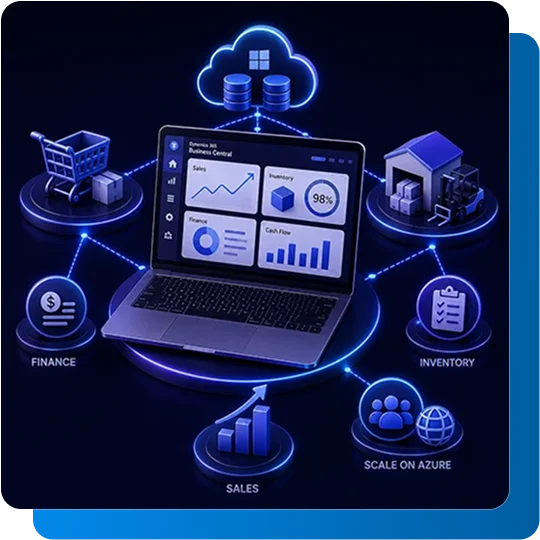
Microsoft Dynamics 365 Business Central uses an interface in which applications share a standard data model to enable real-time sharing and visibility. This means a change made in sales, inventory, or finance reflects instantly across the entire system, with no manual syncing or exports between disconnected tools. Beyond basic CRM, it includes finance and human capital management, as well as business solutions through AI decision-making - Microsoft Copilot within Business Central surfaces suggested actions like reordering low stock or flagging overdue invoices directly inside your daily workflow. Integrate Microsoft Dynamics 365 Business Central API and consulting service to achieve seamless business management and continuous improvement.

  • One connected system: Finance, sales, and inventory update together, in real time, without manual re-entry
  • AI-assisted decisions: Microsoft Copilot flags actions directly inside your workflow, not in a separate report
  • Built to scale: Add users, locations, or currencies on Microsoft Azure without a platform switch
BOOK A CONSULTATION
Streamline Growth With Microsoft Dynamics 365 Business Central Solutions

Authorizing Businesses with Microsoft Business Central Dynamics 365

Dynamics 365 Business Central, Microsoft's AI-powered ERP, boosts steady growth and simplifies procedures to increase business efficiency.

Business without Silos

Enterprises can connect and increase efficiency by utilizing automated activities and workflows within the recognizable Microsoft interface of Word, Excel, and Outlook.

Effective Insights

These are made possible by Microsoft's innovative, intelligent technologies, which help you accomplish more and obtain a comprehensive understanding of the organization through connected data, business analytics, and advice.

Solutions for Growth

With a flexible architecture that simplifies expanding beyond Business Central in response to changing business requirements, these solutions can be swiftly implemented, developed, and adjusted in real-time.

Hire Dedicated Pre-Vetted Talent

Contact and hire experienced MS Dynamics 365 Consultants from all over the world with Concetto Labs. Hire only the best Techno-Functional consultants to help you create unique solutions for your business.

ENQUIRE NOW

Comprehensive Microsoft D365 Business Central Services

Our services include implementation, upgrades, and support, ensuring seamless integration and optimized operations with Microsoft Dynamics Business Central.

Implementation Services

Support predefined roles for effective Microsoft Dynamics 365 BC implementation with improved business processes based on your company's scope. Includes data migration and team training before go-live.

Consulting Expertise

Use our Microsoft Dynamics 365 Business Central consultant to plan and achieve the best results and proper use of the system in your company. Starts with a gap analysis of your current workflows.

Upgrade Solutions

Upgrade seamlessly with Microsoft Dynamics 365 Business Central upgrade services, which improve Business Central functionality and integrate to provide compatibility with others for growth. Covers data migration, cleansing, and validation before cutover.

Customization Support

Get individualized help with BC Microsoft Dynamics 365 BC customization to successfully adapt the solutions and processes to your company's needs. Custom reports and integrations built to survive future Microsoft updates.

Industry-Specific Business Central Solutions

Manufacturing

Track production orders, bills of materials, and routings across job shops or process manufacturing, with real-time visibility into machine capacity and material consumption on the shop floor.

Distribution & Wholesale

Manage inventory and transfers across multiple warehouses from one system, with purchase orders that auto-generate based on demand and vendor performance tracked in real time.

Retail

Sync point-of-sale transactions with inventory and financials in real time, keeping stock levels accurate across every store or channel while tracking customer purchase history.

Professional Services

Track project budgets, time, and expenses in real time, with resources allocated based on availability and priority, and billing simplified through integrated time sheets.

Field Service & Construction

Monitor material, labor, and equipment costs per project or job site, manage fixed assets and maintenance schedules, and update job status directly from the field.

Nonprofit & Financial Services

Track restricted and unrestricted funds separately for compliance, manage grant budgets alongside daily operations, and generate audit-ready financial reports for board review.

Benefits of Microsoft Dynamics 365 Business Central

Unified Business Data

Finance, sales, inventory, and operations run on one shared data model, eliminating the reconciliation errors that come from disconnected spreadsheets and standalone tools.

Faster, Informed Decisions

Real-time dashboards and AI-driven insights through Copilot mean decisions are based on current numbers, not last month's report.

Lower Total Cost of Ownership

As a cloud-based SaaS platform, Business Central removes the need for on-premise servers and reduces ongoing IT maintenance overhead.

Built to Scale

Add users, warehouses, or business units as you grow, without switching platforms or re-implementing your ERP.

Familiar Microsoft Interface

Runs inside Outlook, Excel, and Word, reducing the learning curve for teams already using Microsoft 365.

Stronger Compliance & Control

Role-based access and audit-ready financial records make it easier to meet reporting and compliance requirements as your business grows.

Why Choose Concetto Labs for Business Central

With 10+ years and 500+ delivered projects, our Microsoft-certified consultants have implemented and supported Business Central for businesses moving off QuickBooks, spreadsheets, and legacy ERPs across the world.

tools and technologies

Technologies
  • TypeScript
  • VB.NET
  • F#
  • JavaScript
  • C#
  • .NET Core
  • .NET Framework
  • XAML
Frameworks & Platforms
  • Xamarin
  • WPF
  • ASP.NET
  • ASP.NET MVC
  • Blazor
  • SharePoint
  • ASP.NET Core
  • UWP
  • MAUI
Cloud & DevOps
  • Microsoft Azure
  • Azure Logic Apps
  • Azure Active Directory
  • Azure Functions
  • Azure Kubernetes Service (AKS)
  • Azure DevOps
  • Azure API Management
Development Tools
  • Visual Studio
  • Azure CLI
  • Visual Studio Code
  • NuGet
  • Postman
  • PowerShell
  • Fiddler
AI & Cognitive Services
  • Azure Machine Learning
  • Azure Cognitive Services
  • Azure Bot Service
  • Microsoft Bot Framework
Integrations & APIs
  • Dynamics 365 API
  • Microsoft Graph API
  • Office 365 Add-ins
  • SharePoint API
Databases & Storage
  • Cosmos DB
  • Azure Blob Storage
  • SQL Server
  • Azure SQL
  • Table Storage
  • LiteDB
BI & Visualization
  • SSRS (SQL Server Reporting Services)
  • Excel Services
  • Power BI
  • Azure Monitor
Automation & Low Code
  • Power Automate
  • Power Apps
  • Power Virtual Agents
Libraries & Utilities
  • Entity Framework
  • AutoMapper
  • Serilog
  • SignalR
  • NLog
  • Swashbuckle (Swagger)
PM & Collaboration Tools
  • Trello
  • Slack
  • Microsoft Teams
  • Jira

Frequently Asked Questions

It's a powerful and scalable ERP and company management tool that helps companies to increase client relations, streamline operations, and manage finances better. It can be hosted on-site or in the cloud. Microsoft hosts maintains, and upgrades the cloud-based solution on a monthly basis.

The "umbrella term" for Microsoft's business application suite, including Business Central, 365 Sales, 365 Field Services, 365 Customer Service, and many more, is Dynamics 365. These business apps are all made to fit particular needs within the company. In particular, Business Central is made for ERP tasks, thus companies looking for an "all-in-one" solution can use it.

Although they are both components of the Microsoft Dynamics suite, Business Central and CRM have different features. While CRM is focused on customer relationship management and sales, Business Central is an ERP system.

NAV has evolved into Business Central in the present day. Better interoperability with Microsoft's other products, a real cloud-based deployment, and an easier-to-use interface characterize Business Central.

It is more appropriate to describe Business Central as "implemented" than as installed. To meet your business needs, deployment can be done on-premises or in the cloud using a variety of subscription options.

Cost depends on the number of users, modules required, data migration complexity, and any customizations. $25 - $60 for a standard deployment. We provide a detailed quote after a free scoping consultation.

Most mid-market deployments run 3-4 months from kickoff to go-live. Simpler, standard-module implementations can move faster; projects with heavy customization or complex data migration from a legacy ERP typically take longer.

Business Central is built for small-to-mid-sized businesses, typically in the 10-250 employee range, looking to move off QuickBooks or spreadsheet-based processes. Larger enterprises with highly complex, multi-entity operations may need to evaluate it alongside Dynamics 365 Finance & Operations.

Yes. We handle data extraction, cleansing, and migration from QuickBooks, Dynamics NAV, GP, and most legacy accounting or ERP systems, validating records before cutover to make sure nothing is lost or duplicated in the move.

TEAMS
TEAMS
TEAMS
TEAMS
TEAMS
TEAMS
TEAMS
TEAMS