








• Contact us on WhatsApp WhatsApp
  • Book a Call
  • Contact Us

Trusted By

Trusted by startups and global enterprises across the USA, UK and Europe, Concetto Labs has been delivering high-performance AI-Driven software solutions for over 10+ years, helping ambitious businesses scale faster, deliver smarter and perform stronger in an ever-evolving digital world.

Trusted by
Trusted by
Trusted by
Trusted by
Trusted by
Trusted by
Trusted by
Trusted by
Trusted by
Trusted by
Trusted by
Trusted by
Trusted by
Trusted by
Trusted by
Trusted by
Trusted by
Trusted by

Partner with a Leading Microsoft Outlook Add-In Development Company

Partnering with Concetto Labs, the top Outlook Add-in Development Company guarantees top-notch solutions from industry specialists. Our reliable team excels in delivering Outlook add-in development services, focusing on designing seamless, intuitive, and effective add-ins that improve functionality and productivity. You can access a wealth of experience and technical expertise by selecting us as your Microsoft Outlook plugin development company. Our dedication to quality and client satisfaction sets us apart, making us the preferred choice for businesses looking to build their first Outlook add-in or enhance existing functionalities. Whether you need to develop Outlook add-ins for specific business requirements or want to improve your overall email management, our customized solutions cater to all your needs—Trust Concetto Labs to deliver exceptional Outlook add-in development services that propel efficiency and streamline workflows.

get in touch
Partner with a Leading Microsoft Outlook Add-In Development Company

Portfolio

Our Microsoft Outlook Add-In Development Services

We offer a full range of Microsoft Outlook add-in development services — from custom builds and CRM/ERP integrations to AI-powered automation and cross-platform solutions. Every add-in is built to your exact business requirements.

Custom Microsoft Outlook Add-In Development

We build bespoke Microsoft Outlook add-ins from scratch using Office.js or VSTO — tailored to your exact business logic, communication workflows, and user requirements. Every add-in integrates natively into Outlook on Windows, macOS, and the web.

Email Workflow Automation Add-Ins

We automate repetitive email workflows — routing, categorisation, auto-replies, approval chains, and follow-up reminders — so your team spends less time managing their inbox and more time on high-value work.

CRM & ERP Integration Add-Ins

We connect Outlook directly to Salesforce, Microsoft Dynamics 365, HubSpot, Zoho, SAP, and custom CRMs — enabling real-time data sync, context-aware customer views, and CRM record updates without leaving your inbox.

Calendar & Scheduling Add-Ins

Our scheduling add-ins provide advanced meeting coordination, room booking, availability checking, and calendar integrations with third-party tools — keeping your team organised and meetings running efficiently.

AI-Powered Email Assistants

We embed intelligent AI features directly into Outlook — smart email drafting, sentiment analysis, automated summaries, predictive replies, and priority inbox scoring — powered by Azure OpenAI or your preferred AI platform.

Security, Compliance & Migration

We build add-ins that enforce email security policies, encrypt sensitive communications, and ensure GDPR, HIPAA, and SOX compliance. We also modernise legacy COM add-ins to modern Office.js for full cross-platform compatibility.

Outlook Add-in Development for Your CRM

Boost your productivity and streamline your workflow with our custom Outlook add-in development tailored for your CRM system. With our solution, you can seamlessly integrate CRM data right into your Outlook inbox — eliminating the need to switch between platforms.

Fetch CRM Data Instantly

Access key customer information directly within Outlook. View leads, contacts, opportunities, and account details pulled in real-time from your CRM.

Update Records Without Leaving Outlook

Make changes to CRM records such as updating contact info, notes, or sales status — all from within your email interface.

Context-Aware Views

When you open or compose an email, the add-in intelligently pulls related CRM records based on the sender or recipient, giving you immediate context.

Seamless Integration

It can be created for any kind of CRM or can be Designed to work with major CRM platforms like Salesforce, Microsoft Dynamics, Zoho, HubSpot, and custom CRMs — our add-ins are secure, efficient, and fully compliant.

Our Core Expertise in Outlook Add-ins Development

At Concetto Labs, we excel in Outlook add-in development and offer specialized services.

  • User-Centric Design
    User-Centric Design

    Our user-centric design approach ensures that the add-ins we develop are intuitive, easy to use, and tailored to enhance user experience, making your Outlook more functional and user-friendly.

  • Seamless Integration
    Seamless Integration

    We specialize in creating add-ins that integrate seamlessly with Outlook, ensuring smooth functionality and enhancing the overall efficiency of your email and task management processes.

  • Advanced Customization
    Advanced Customization

    Our expertise in advanced customization allows us to develop add-ins tailored to your specific business needs, providing solutions that address unique challenges and improve productivity.

  • Performance Optimization
    Performance Optimization

    We focus on performance optimization to ensure that the add-ins we develop are fast, reliable, and efficient, providing a smooth and uninterrupted user experience.

  • Cross-Platform Compatibility
    Cross-Platform Compatibility

    Our add-ins are designed for cross-platform compatibility, ensuring they work seamlessly across different devices and Outlook versions, enhancing accessibility and usability.

  • Security and Compliance
    Security and Compliance

    Our add-in development process prioritizes security and compliance, ensuring your data is protected, and our solutions adhere to industry regulations and standards.

  • Ongoing Support and Maintenance
    Ongoing Support and Maintenance

    Our commitment to excellence includes ongoing support and maintenance, ensuring your add-ins remain up-to-date, secure, and functional, providing continuous value to your business.

Discover Our Expertise In Office 365 Add-In Services

We offer a range of Office 365 add-in services aimed at improving efficiency and optimizing operations throughout your business applications.

Develop innovative add-ins to simplify the creation of presentations, integrate multimedia elements, and streamline collaboration in PowerPoint.

Word Add-in

Create powerful tools to automate document creation, improve editing efficiency, and enhance overall productivity in Word.

Leverage our custom services to streamline workflow, improve data accuracy, and optimize corporate operations.

Gmail Add-in

Build custom add-ins to enhance email organization, integrate third-party applications, and boost productivity within Gmail.

Google Sheets Add-in

Design add-ons to improve data analysis, automate repetitive tasks, and enhance functionality in Google Sheets.

Ready to Transform Your Business?

Discover our work to drive success and take business to new heights!

Hire our Developer

Custom Outlook Add-ins That Work

Are you hunting for an Outlook Add-ins Expert? Enhance the productivity within Outlook by using clever and secure add-ins that are designed for automation and perfect integration of Microsoft 365.

Get A Free Consultation
Hire Our Developers

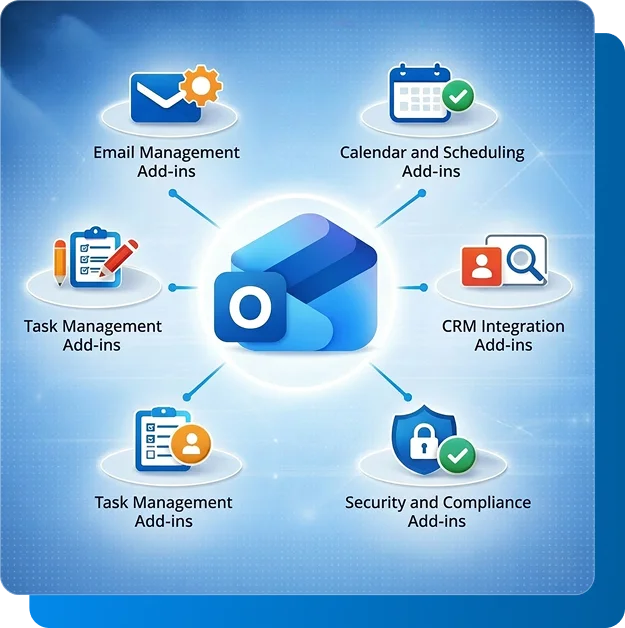
Benefits of Using Outlook Add-ins

Utilize Outlook add-ins to enhance productivity, streamline workflows, and improve your email management experience.

Improved Productivity

Outlook add-ins help automate routine tasks, allowing you to focus on more critical activities. These add-ins streamline your workflow by integrating advanced features and tools, boosting productivity.

Enhanced Email Management

Increase efficiency by leveraging automation tools and options that can help with formatting, data visualization, and producing content.With Outlook add-ins, managing your inbox becomes more efficient. These tools help you categorize, prioritize, and organize your emails, reducing clutter and ensuring you never miss critical communications.

Seamless CRM Integration

Integrate your CRM with Outlook to enhance customer relationship management. CRM add-ins synchronize data and streamline interactions, allowing you to manage customer information directly from your email interface, improving efficiency and customer service.

Advanced Scheduling Tools

Outlook add-ins provide advanced scheduling and calendar management features. These tools help you coordinate meetings, set reminders, and manage appointments effortlessly, ensuring you stay organized and manage your time effectively.

Increased Security and Compliance

Security and compliance add-ins ensure your email communications are secure and adhere to industry regulations. These tools help protect sensitive information, maintain data privacy, and ensure compliance with relevant laws and standards.

Customizable Solutions

Outlook add-ins offer customizable solutions tailored to your specific business needs. These add-ins can be designed to address unique challenges and requirements, providing a personalized and efficient email management experience.

Industry Solutions for Microsoft Outlook Add-Ins

We build Microsoft Outlook add-ins tailored to the specific communication workflows and compliance requirements of different industries — helping teams work faster, smarter, and more securely directly from their inbox.

Finance & Banking

We build Outlook add-ins for financial institutions that surface deal data, automate compliance email flagging, integrate with trading platforms, and enable secure client communication — all without leaving Outlook. Supports SOX and GDPR workflows.

Sales & CRM

Our Outlook add-ins give sales teams instant access to CRM data inside their inbox — pulling leads, contacts, and deal stages from Salesforce, Dynamics, HubSpot, or Zoho in real time, with one-click record updates and activity logging.

Healthcare & Life Sciences

We develop HIPAA-aware Outlook add-ins for secure patient communication, appointment scheduling, and clinical data referencing. Healthcare teams can manage sensitive correspondence with full compliance directly from their inbox.

Legal & Compliance

Our add-ins help legal teams manage case-related email threads, auto-tag correspondence by matter, surface relevant document links, and enforce email retention policies — reducing risk and improving matter management efficiency.

HR & Recruitment

We build Outlook add-ins for HR teams that integrate with ATS platforms, automate candidate status emails, enable interview scheduling, and surface employee records — streamlining recruitment and HR communication workflows.

E-Commerce & Retail

Our add-ins connect Outlook to e-commerce platforms and order management systems — surfacing customer order history, support ticket status, and shipment tracking directly inside email threads for faster customer service response.

Our Outlook Add-In Development Process

We follow a structured, transparent process to deliver Microsoft Outlook add-ins that are reliable, scalable, and perfectly aligned with your communication and business workflow needs — from discovery to deployment and beyond.

Requirements & Discovery

We start with a deep discovery session to map your email workflows, integration requirements, user personas, and compliance needs. This produces a clear technical specification and project roadmap before a single line of code is written.

UI/UX Design

Our designers create task pane interfaces that feel native to Outlook — clean, intuitive, and consistent with Microsoft's Fluent UI design language. We prototype and test with real users before development begins.

Technology Selection & Development

We select the right stack for your needs — Office.js for cross-platform compatibility, VSTO for Windows-native depth, or a hybrid approach. Our engineers write clean, documented, and secure code at every stage.

Testing & Cross-Platform QA

We test extensively across Outlook for Windows, macOS, and the web — covering all supported Exchange and Microsoft 365 configurations. Every add-in passes functional, performance, and security testing before delivery.

Deployment & Ongoing Support

We handle deployment — via Microsoft AppSource, Microsoft 365 Admin Center, or internal distribution. Post-launch, we provide continuous support, updates, and feature enhancements as your needs evolve.

Built on Agile Methodology

Our Agile process delivers working builds sprint by sprint — giving you visibility, the ability to provide feedback, and the flexibility to adjust scope at any stage. No surprises at launch.

Flexible Engagement Models

Every Outlook add-in project is different. Choose the engagement model that best fits your requirements, timeline, and budget — with the flexibility to scale up or adjust as your project evolves.

Time & Material

A flexible pay-as-you-go model for projects with evolving requirements, phased delivery, or ongoing feature development. You pay only for the actual hours and resources used, with full transparency through regular time reporting.

Best for: Agile builds, MVPs, iterative feature development.

Fixed Price

A clearly scoped project with an agreed timeline and cost. Ideal for well-defined Outlook add-in requirements where you need budget certainty. Includes defined milestones, deliverables, and sign-off at each stage.

Best for: Well-scoped projects, one-time builds, fixed budgets.

Dedicated Team

Hire a dedicated team of Outlook add-in developers who work exclusively on your project. You retain full control over tasks, priorities, and sprints while we ensure seamless delivery and long-term support.

Best for: Enterprise projects, long-term partnerships, scale-ups.

Frequently Asked Questions

Outlook add-ins improve productivity by automating repetitive tasks, integrating advanced features, and providing seamless access to additional tools directly within the Outlook interface. This helps streamline workflows, reduce manual effort, and allow users to focus on more critical tasks.

Yes, you can use multiple Outlook add-ins simultaneously. They are designed to work together within the Outlook environment, enhancing various aspects of email management, scheduling, and task organization without interfering with each other’s functionality.

The cost of Outlook add-ins can vary. Some add-ins are free, while others may require a one-time purchase or a subscription fee. Pricing often depends on the features and level of customization offered by the add-in.

Yes, Outlook add-ins can be customized to address specific business needs. Customization options include tailored features, personalized interfaces, and integration with other software systems, ensuring the add-in provides solutions unique to your organization's requirements.

Support options for Outlook add-ins typically include online documentation, user guides, FAQs, and customer support from the add-in developer. Many providers offer technical support services for installation, customization, and troubleshooting.

TEAMS
TEAMS
TEAMS
TEAMS
TEAMS
TEAMS
TEAMS
TEAMS